
Building a Browser-Based Flight Search Agent with MCP and CDP
- Published on
- • 5 mins read•--- views
Flight results are rendered dynamically in the browser. The initial page only contains part of the results, and more itineraries are loaded when the user moves to the next page. The useful data is therefore not always available in the initial HTML.
I built Sky Scraper to explore a practical question:
Can an AI agent search live flight data through a browser and receive results in a structured format it can reason over and use in follow-up requests?
The project combines an open-source contribution to agent-browser, a Chrome Extension, Chrome DevTools Protocol (CDP), WebSocket task dispatch, and a custom Model Context Protocol (MCP) server.
The key design decision: discovery is different from production capture
The system has two distinct phases.
Phase 1: discover the API with agent-browser
I used agent-browser to investigate the browser session and understand the network traffic produced by a flight search. Its network inspection workflow made it possible to:
- identify candidate XHR/fetch requests;
- filter noisy browser traffic;
- inspect request and response details;
- find the response containing the complete itinerary data;
- compare the request shape across different routes and dates.
This work led to my contribution to agent-browser: network request detail and filtering for request tracking. The contribution is useful beyond this project because API discovery is a common first step when automating modern web applications.
See the agent-browser repository and my open-source contribution profile.
Phase 2: collect live results with the Chrome Extension
Once the browser data flow was understood, I did not need to launch the analysis CLI for every search. The production path uses the Chrome Extension to run the search in a connected browser session and collect the resulting flight data:
MCP client
  -> MCP server
  -> WebSocket task queue
  -> Chrome Extension
  -> browser search and data collection
  -> normalized flight result
The extension receives the search parameters, opens or reuses the search tab, waits for the live results, and extracts the flight data into a predictable format. The implementation details discovered during the investigation stay inside the extension instead of becoming part of the agent-facing interface.
This separation keeps the system simple: agent-browser is the investigation tool, while the extension is the repeatable capture runtime.
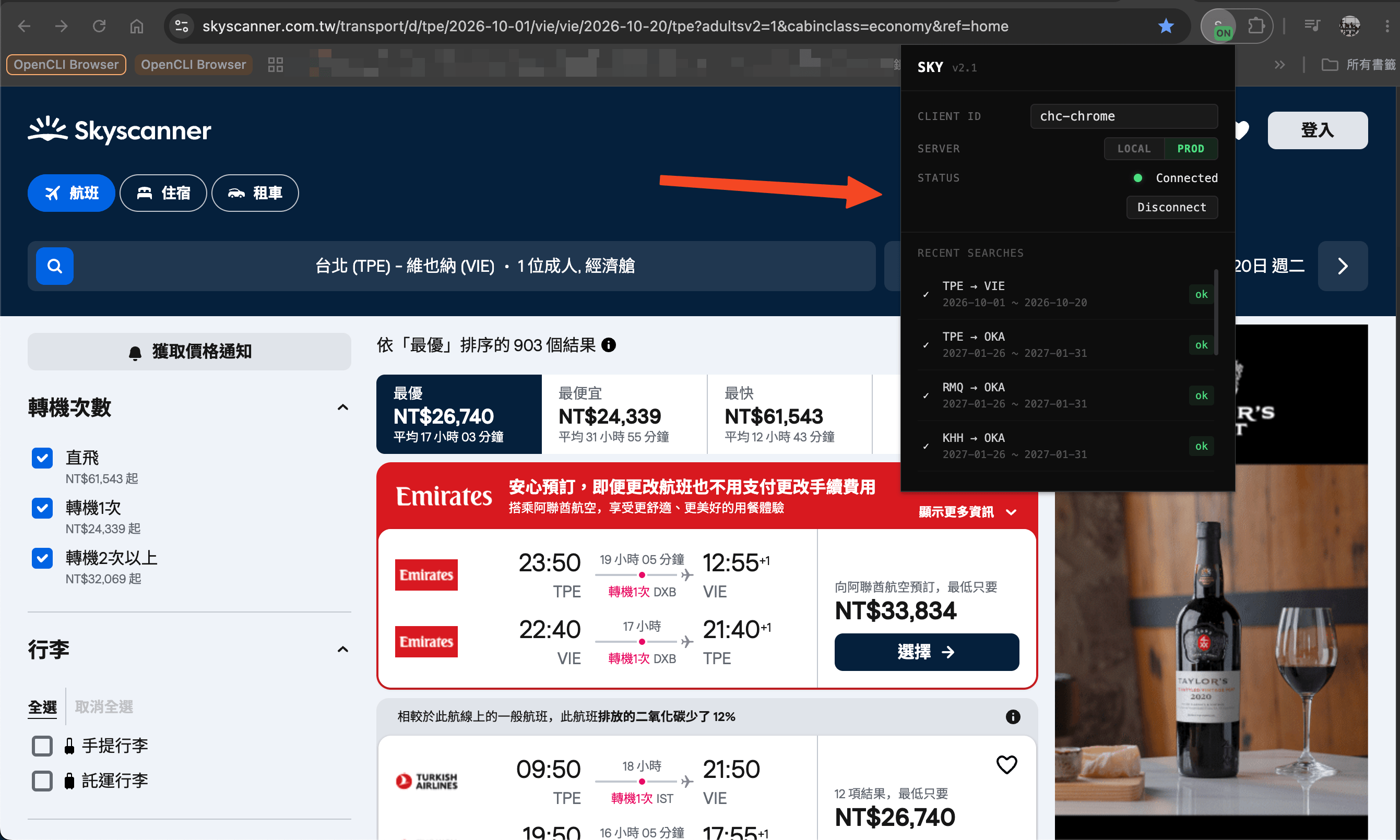
The extension keeps the browser-side connection visible and keeps a small history of completed searches. The agent only needs to provide the route and dates; it does not need to know the website-specific details behind the search.
Waiting for the right response
Capturing the first matching request is not enough. A modern search page may issue multiple requests while results are loading, and an early response can be incomplete.
The extension therefore waits for two conditions:
- the matching request finishes loading;
- the response body contains the completion signal used by the search flow.
Only then does it send the payload to the server. This avoids returning partial itineraries to the agent.
MCP as the agent-facing interface
The server exposes a small MCP surface instead of leaking browser implementation details to the AI agent:
statuschecks the extension connection and queue state;searchsubmits one or more flight-search tasks;resultslists or reads normalized result files.
The search tool accepts structured legs, for example:
{
  "searches": [
    {
      "legs": [
        { "from": "tpet", "to": "muc", "date": "2026-11-15" },
        { "from": "muc", "to": "tpet", "date": "2026-11-20" }
      ]
    }
  ],
  "adults": 1,
  "cabin": "economy",
  "stops": "direct+one"
}
The MCP layer binds a session to a specific extension client. That prevents one agent session from accidentally reading another browser client's results.
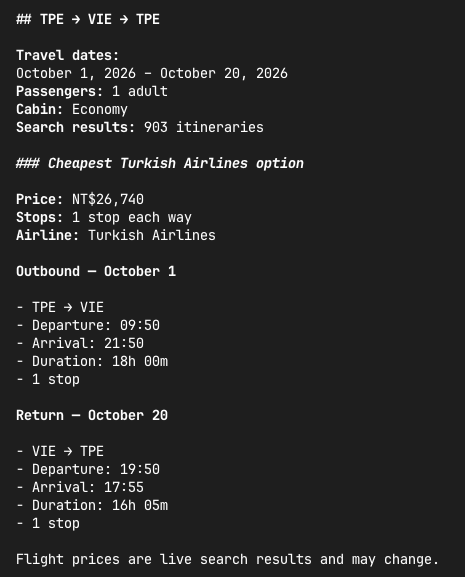
Here is an example of the normalized result returned from the MCP workflow:
Normalizing the raw response
The raw response is useful for debugging, but an agent needs a smaller domain model. The server extracts:
- price and raw price value;
- marketing airlines;
- origin and destination codes;
- departure and arrival times;
- duration;
- stop count.
It also groups results into cheapest overall, direct, one-stop, and two-or-more-stop categories. This makes follow-up questions such as “show me the cheapest direct option” possible without asking the model to repeatedly parse the full browser payload.
Reliability features
Browser automation fails in ways that ordinary HTTP clients do not. The project includes several recovery mechanisms:
- WebSocket heartbeat and reconnect handling;
- per-client task queues;
- result buffering while the WebSocket is disconnected;
- duplicate-result protection;
- task timeouts;
- closed-tab recreation;
- DOM scraping fallback when API capture is unavailable.
The fallback is intentionally secondary. API capture is the preferred source, while DOM extraction keeps the workflow useful when the site's browser-side data flow changes or the preferred collection path is unavailable.
What I learned
The main lesson was that browser automation is not only about clicking buttons. For data-heavy applications, the browser is also a live API client.
The most useful workflow was:
Observe -> identify -> validate -> implement -> normalize -> expose
The open-source contribution improved the investigation phase. The Chrome Extension and MCP server turned that investigation into a reusable agent capability.
What I would improve next
These are possible directions rather than required features:
- making an interrupted search resumable or safely retryable;
- persisting task state on the server so queued work can survive a restart;
- improving task routing and ownership when multiple Chrome clients are connected.
This project is still an experiment, but it represents the kind of system I enjoy building: a thin agent interface over a reliable integration layer, with the difficult browser-specific work isolated behind clear boundaries.
Table of Contents
- The key design decision: discovery is different from production capture
- Phase 1: discover the API with agent-browser
- Phase 2: collect live results with the Chrome Extension
- Waiting for the right response
- MCP as the agent-facing interface
- Normalizing the raw response
- Reliability features
- What I learned
- What I would improve next